Ten days ago I started using four ultra low-cost ATOM-processor based tablets (running under Windows 10) as monitoring stations (or “remote probes”, as we call them in the context of PRTG). Each of them was monitoring about 100 sensors in my home lan, including wifi quality and temperature. Here are my experiences of the first 10 days:
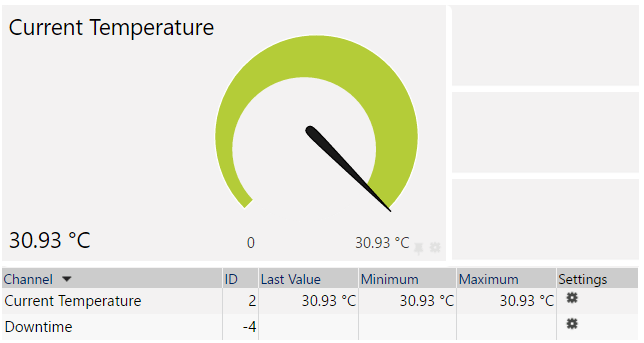
How to monitor the system temperature of a Windows 10 system with PRTG
Three days ago I set up 4 low-cost Windows 10 tablets to become cheap monitoring stations in my private home. Yesterday I added custom sensors to monitor the quality of my wireless network.
Today I added sensors that are getting the built-in system temperature from the tablets.
Again I am using a Exe/Script Advanced Sensor with this Powershell script
Continue reading “How to monitor the system temperature of a Windows 10 system with PRTG”
How to monitor wifi signal strength and speed with PRTG Network Monitor
Two days ago I set up 4 low-cost Windows 10 tablets to become cheap monitoring stations (we call them “remote probes”) for my personal instance of PRTG Network Monitor.
Today I have set up a custom sensor that reads out the wifi signal strength from the system, so I can now monitor the quality of my wireless network in 4 different areas of my house when I distribute the tablets in different rooms.
The sensor can be used with all Windows 10 PCs, laptops, or tablets, as long as they are connected to the network via wifi. It also displays the transmit and receive rate which the wifi module has chosen to connect to the access point and the wifi channel.
Continue reading “How to monitor wifi signal strength and speed with PRTG Network Monitor”
Comparing 4 ultra low cost Windows 10 tablets (€64 and up) for use as wifi monitoring stations for PRTG
Many IT admins maintain not only one copper-based network, but also remote sites and wifi networks. To monitor these (more-or-less) remote locations our monitoring software PRTG Network Monitor offers the “remote probe” feature (other vendors call this polling engine, poller, agent, etc.). The user can create as many of them as desired at no additional cost.
The idea is to install a small piece of software on a PC at the remote location. Then it connects to the central monitoring server, receives its configuration, starts monitoring and sends results to the monitoring server.
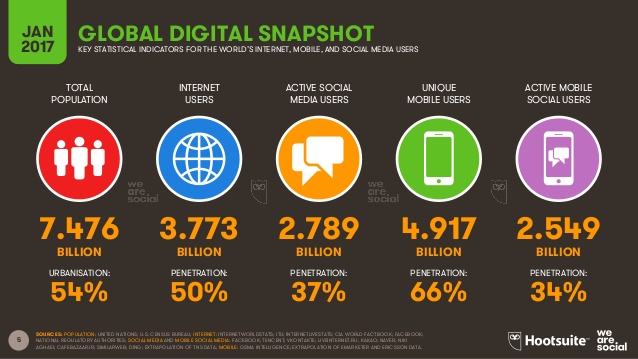
Digital in 2017 Global Overview
Did you know…
- that 50% of the 7.5 billion people on earth are Internet users (annual growth 10%)
- that >85% of the people in North America and Europe are Internet users
- that 66% of the 7.5 billion people on earth are mobile phone users, and each one of them has 1.6 SIM cards/contracts on average (8 billion, more SIM cards than people on earth)
- that 45% of global web traffic comes from laptops & desktop (down by 20% from last year)
- that 50% of global web traffic comes from mobile phones (up by 30%)
- that 37% of the global population are social media users and 55% of them check in every day
- that an average smartphone uses 1.9 GB of data per month (globally!)
How do you explain the security threats of smart home and IoT devices in private home networks to your technologically challenged peers?
Our modern tech-life creates more and more security and privacy threats. Most ordinary people have no idea about the implications which affect all of us. Everybody is installing hordes of connected smart devices like web cams, access-points, thermometers, speakers (e.g. Amazon Echo), light bulbs, etc. in their homes. But: Are they aware what it means to have all these devices that talk to the outside world?
The people from Kurzgesagt (“In a nutshell”), a German animation company that creates wonderful explanatory videos (check out their Youtube channel!), have created a nice video that we tech people can now share with our non-tech peers to educate them.
The End of Cloud Computing…
BYOD is not your enemy. It’s the future. Make “BYOD First” your strategy for 2017!
There are no sacred cows to someone who believes that consumer devices and self-service IT are the keystones of the new business office world. One of these cows is wired Ethernet in the workplace. It will largely go away soon!
Here is an extreme example: Last August Microsoft announced that they are ditching copper-based Ethernet in 660 campuses in favor of WiFi-only offices over the next 24 months.
“Our users don’t simply use a workstation at a desk to do their jobs anymore. They’re using their phone, their tablet, their laptop and their desktop computer, if they have one,” said Lef in a Q&A published in the Microsoft Azure Blog. “It’s evolved into a devices ecosystem rather than a single productivity device, and most of those devices support wireless. In fact, most of them support only wireless.”
David Lef, principal network architect at Microsoft IT.
Sensors vs. Monitors vs. Probes vs. Checks
Comparing the terminologies of PRTG, WhatsUp, OpManager and SAM
Almost 20 years ago when I started my monitoring software company and wrote the first monitoring code (for “IPCheck” as it was called back then) I decided to use the word “sensor” as the name for the most basic monitoring item and the “probe” would be thing that gathered the data.
At about the same time people at Ipswitch, Solarwinds and ManageEngine had to make similar decisions, but they made different naming decisions that differenciate us to this day.
Continue reading “Sensors vs. Monitors vs. Probes vs. Checks”
Things that keep us from reaching 100% uptime: Power Grid Outages
The mission of our company is to build products and services to help system administrators reach 100% uptime for their networks. We all know that it becomes harder and harder to reach 100% the closer you come to your goal, it’s like trying to reach the speed of light.
One of the limitations that system administrators can’t do much about is the reliability (or failure rate) of the electrical power grids they have to rely on. In a data center it is pretty easy to get around this problem by installing uninterruptible power supplies (ups): using a generator you can run a data center off-the-grid for days.
But what about the on-site networks that you serve with that data-center, the people in the offices and factory buildings. Your ups won’t help. When the power grid fails, your computer-using colleagues will twiddle their thumbs until power is coming back again.
Continue reading “Things that keep us from reaching 100% uptime: Power Grid Outages”
You must be logged in to post a comment.